


If you’ve been wondering whether your website is showing up in Google’s AI-generated answers, you’re not alone. For a long time, the only way to find out was to use a workaround inside Google Search Console, filtering your data in a very specific way to try to spot your AI appearances. It worked, but it wasn’t exactly obvious.
Other tools had given us this option, but I didn’t quite trust any of those to be accurate.
Good news: Google just built a dedicated report for it.
What’s the New Generative AI Performance Report?
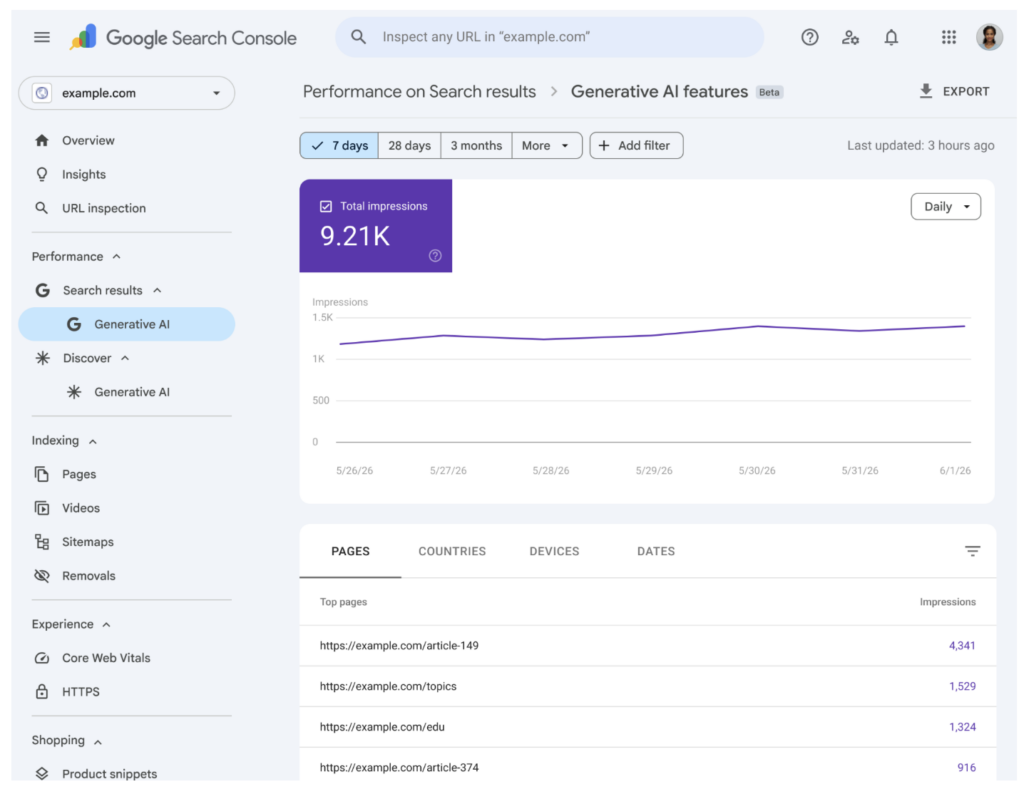
As of June 3, 2026, Google began rolling out a brand-new Generative AI performance report directly inside Google Search Console. Instead of piecing together data through filters, you now get a dedicated view that shows you exactly how often your pages are appearing inside AI Overviews and AI Mode.
That means you can finally see:
- Which pages on your site are showing up in AI-generated results
- How many impressions those appearances are generating
- Which countries are finding you through AI search
This is a big deal. Google is officially treating AI search as its own measurement category, as they should after switching regular Google Search for AI powered search. It also confirms that AI visibility is something worth tracking, growing, and optimizing on purpose, and you should definately add that to your strategy.
How to Find It (Step-by-Step)
Here’s how to check if the report is live in your account:
- Open Google Search Console and click into your website
- In the left sidebar, click “Performance,” then “Search results”
- Look for a new “Generative AI” tab or view at the top of the report
If you see it, great! You’ll find impressions data, your top-performing pages in AI results, and country breakdowns.
What If You Don’t See It Yet?
Don’t panic. Google is rolling this out gradually, so it may not be in your account yet. Even Google’s own team has noted they haven’t seen it in all accounts. You’re in good company if the tab isn’t there yet.
In the meantime, you can still spot your AI appearances the old-fashioned way: go to your Performance report, click the “+” filter button, and filter by “Search Appearance” → “AI Overviews.” It’s not as clean, but it works.
Why This Matters for Your Business
Here’s the bigger picture: AI search isn’t going away. Google’s AI Overviews and AI Mode are becoming a primary way users find answers online, which means if your website isn’t showing up in those AI results, you may be invisible to a growing chunk of your potential customers.
Having a dedicated report means you can now track and grow your AI visibility intentionally, not just guess and hope.
This is exactly the kind of shift we help our clients navigate at PiperMache Website Studio. If you want to make sure your website is structured, written, and optimized to show up in AI search, that’s what I do.
→ Book a free consultation to talk about your website’s SEO/AI search strategy.



Comments Off on Google Just Made It Way Easier to See If You’re Showing Up in AI Search